AI app builders have become very good at generating interfaces. From a technical perspective, that part is mostly solved. The harder problem is what comes next: connecting real data, enforcing user permissions, handling workflows, and deploying the app after the generation.
I was recently introduced to Softr, an AI no-code platform for building full-stack web apps. You can start from scratch using Softr’s database or build on existing data. At first, I thought it was another AI web app builder, but I was wrong. So give me about 5–10 minutes, and I will show you what you can do with it.
What Softr Is
Softr is a full-stack no-code app builder for turning real data into real applications. It’s built for teams and builders who want to create internal tools, dashboards, and operational apps without writing code, while keeping structure, security, and control.
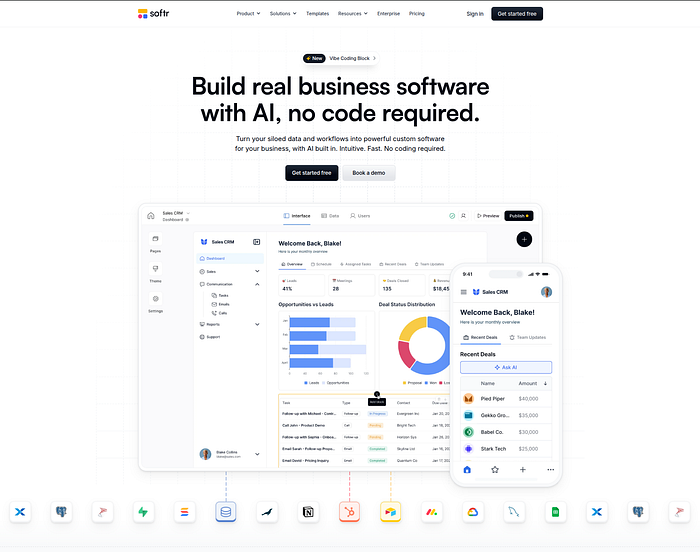
Unlike many tools that focus only on the front end, Softr natively provides the three core components of an app: the interface, the database, and workflows.
The interface is where users log in and interact, the database stores structured data, and workflows make the app dynamic by triggering automations and integrations.
What You Can Build with Softr
For example, you can build an internal sales dashboard connected to a spreadsheet, a client portal where each customer sees only their own data, an operations tool for managing records and statuses, or a reporting app that updates automatically as data changes.

You can start from scratch using Softr Databases as your backend, or you can migrate or use existing data from other tools. Softr supports more than 17 data sources, including:
- Google Sheets
- Notion
- HubSpot
- Supabase
- SQL
- Airtable
- Softr’s own database
- And more
Once the data is connected, you build pages that display, filter, and update that data. Users can log in, see different views based on their role, and interact with the app in a controlled way. All of this you can do without writing a single line of code!
Workflows and Integrations
Beyond data and UI, Softr includes native workflows that are deeply integrated into the apps you build. These workflows let your app respond to events and interact directly with your app’s data.

For example, a workflow can:
- Update app data (e.g. when all tasks are marked Done, automatically mark the project as Done in the database)
- Connect to other tools (e.g. send reminder emails before a task’s due date, notify your team on Slack)
- Use AI (e.g. generate an AI summary from a record and send it by email)
Workflows can be triggered by user actions such as button clicks or form submissions. While the workflow runs, the user can see a loading state, then be redirected to another page or shown a personalized message. This tight integration is a key advantage compared to using external automation tools alone.
Softr also integrates with third-party automation platforms such as Zapier, Make, and n8n, enabling your app to connect to larger systems rather than operate in isolation.
AI in Softr
On top of this foundation, Softr adds several AI-powered features, including the Vibe Coding block, Database AI Agents, Ask AI, and other AI-assisted capabilities.
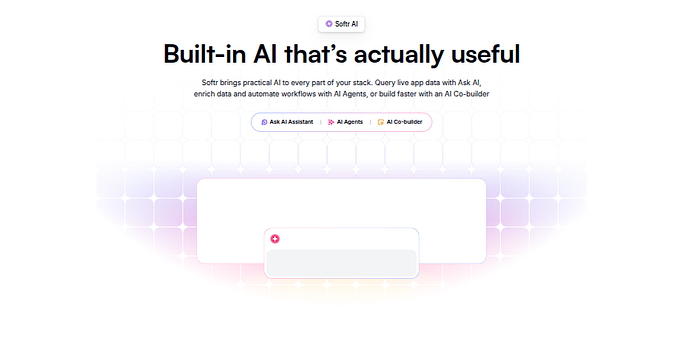
Each of these serves a different purpose, but the most interesting for building custom apps is AI for the builder, including the Vibe Coding block and AI-assisted database and workflow creation. This is where the rest of this article will focus.
Vibe Coding Block
Most no-code platforms rely on predefined components. These components are useful and fast, and for most business apps, they should not be reinvented. Tables, kanban boards, forms, and simple charts are common patterns that users already understand.
But this approach also creates a ceiling. When you reach the small set of blocks that need deeper customization, predefined components are no longer enough. The Vibe Coding block is Softr’s answer to that limitation.
It lets you describe custom UI and application logic in natural language and generate it directly inside a Softr app. Instead of working around existing blocks, you can define new behavior where it’s needed.
Vibe Coding blocks are fully dynamic. They natively and safely connect to real data sources, such as Softr Databases, Airtable, or Google Sheets, and respond to filters, user input, and state changes in real time. They support conditional logic and visibility rules, so interfaces behave differently based on the user, role, or context.
You can also use Vibe Coding to generate custom forms, internal tools, or interactive components that don’t exist as default blocks. This is where the platform starts to feel less like a template-based builder and more like a flexible application framework.
Because the Vibe Coding block lives within Softr’s system, it uses the same data model, permission rules, theme, and workflows as the rest of the app. Any logic you generate respects access controls, follows the app’s visual theme, and can trigger the same automations and integrations, making it suitable for real, production use.
How to Use the Vibe Coding Block
Let’s look at a few concrete examples to see how the Vibe Coding block behaves inside a real Softr app.
You can find the “Vibe coding” block in the “Browse blocks” section.
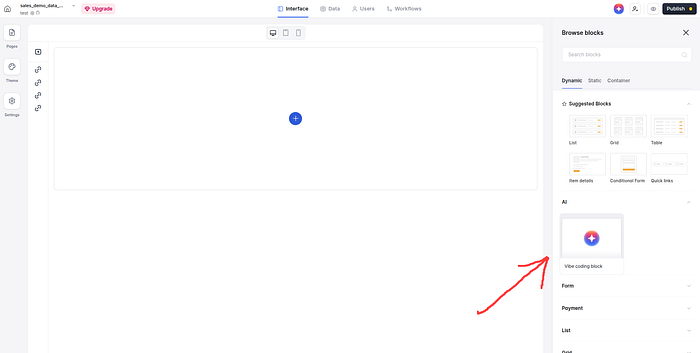
Click the yellow plus button in order to add the block to the canvas.

Then select your data source from the “Source” tab
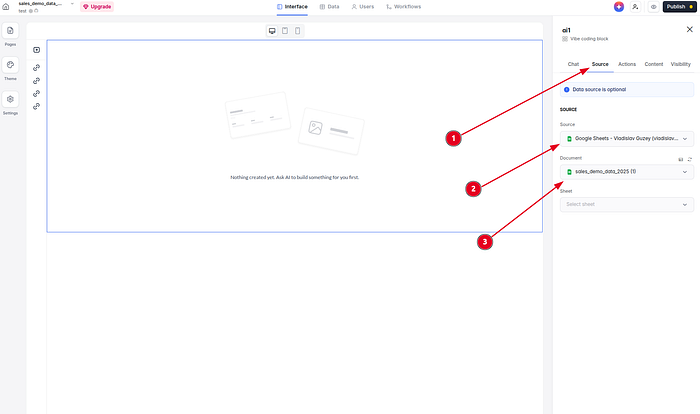
Use case: Interactive Quiz
My first example is an interactive quiz. Here is the prompt:
Based on the database listing questions, generate an interactive quiz block allowing to pick an answer from the list of answers, reveal a hint to get help, and goes through the questions one by one before showing a final result screen with the score, also allowing to review all answers
And this is the result:
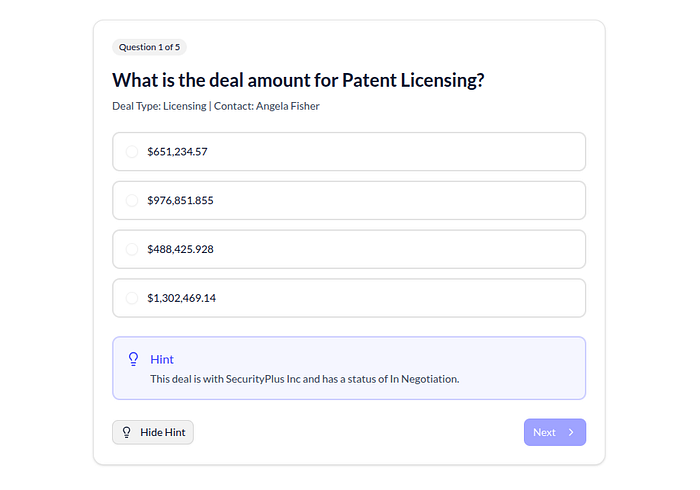
Use Case 2: Mini CRM
In my second example, I showed a mini CRM. We built a “Deal pipeline”. The prompt:
Create a lightweight CRM interface. Allow adding a contact. Display deal stages in a Kanban view. Enable drag-and-drop to update stages. Show deal value totals per column.
In about 2 minutes, I got my mini CRM.
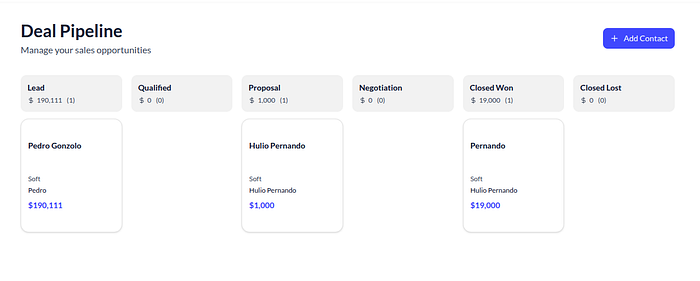
Use Case 3: Sales Dashboard
In my final example, I created a sales dashboard using data from my Google Sheet. This is the prompt:
Generate an executive sales dashboard using the sales database.
At the top, create KPI cards showing:
- Total Revenue
- Deals Closed This Month
- Average Deal Size
- Win Rate
Add visual indicators showing growth or decline compared to last month.
Below the KPI cards, create:
- A revenue trend line chart by month.
- A bar chart showing revenue by sales rep.
- A funnel visualization for pipeline stages.
- A table listing high-value deals over $25,000.
Highlight negative trends in red and positive trends in green.
Make the layout clean, modern, and optimized for quick executive review.
The result:

And all of these without writing a single line of code!
Video Example of Vibe Coding Block in Action
In the video below, I’ll walk you through the process step by step. You will see how I’m using the Vibe coding blocks, and by the end, we’ll publish the app so it’s ready for real end users.
Watch on YouTube: Softr Tutorial — Build A Real APP, Not a Prototype
Deploying the App
Once the app is ready, deployment is straightforward. You just click a couple of buttons in the interface, and that’s it. You’re not exporting code or moving to another environment. The app you build is the app that gets published.
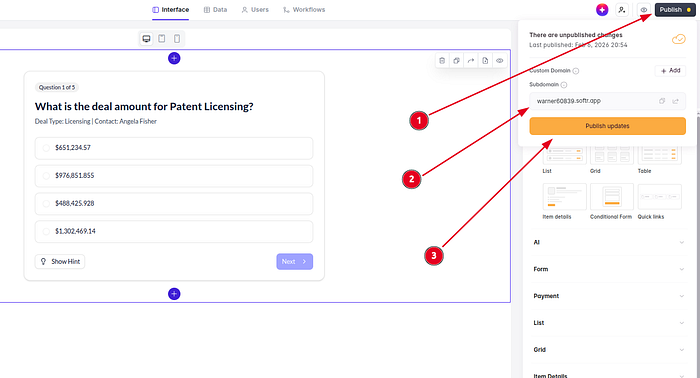
You can choose whether the app is internal, restricted to logged-in users, or publicly accessible. For internal tools, access is usually limited to specific roles. For public apps, you can still control which parts require authentication.
Deployment here means making the app available to real users, not sharing a prototype link.
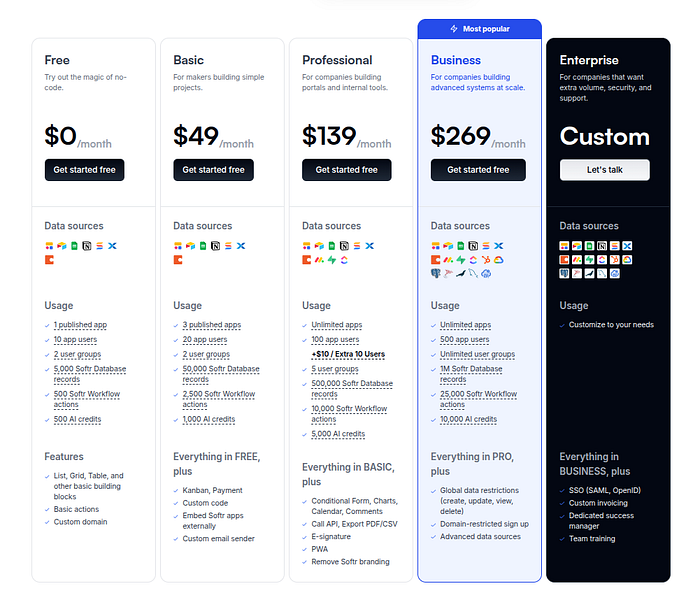
Softr Pricing
You can start with Softr for free or choose a package below.
Conclusion
If you already have data and want to build a real app on top of it without writing code, Softr is worth exploring. Most business apps don’t need to be reinvented, and asking AI to generate everything end-to-end only increases the risk of errors and debugging.
By using AI where it makes sense, like vibe-coding custom blocks on top of a reliable, modern no-code infrastructure, you get the flexibility of AI with the stability needed to ship robust, production-ready business apps.
Give it a shot and share your feedback in the comments below.
Cheers, proflead! ;)