


AI coding assistants are becoming better every day. But most still work one prompt at a time. You ask something, get an answer, and then guide the next step manually.
The new /goal command in OpenAI Codex changes this workflow.
Instead of asking for isolated answers, you can give Codex a long-term objective with clear success conditions. Codex can investigate, write code, run tests, and continue working toward the result over multiple steps.
For examples of clear deliverables, constraints, and completion checks, see my Codex prompt and instruction guide.
In this guide, you'll learn:
- What
/goaldoes - How it works
- How to enable it
- Real examples
- Best practices
- Common mistakes
What Is the /goal Command in Codex?
The /goal command lets you define a persistent objective for Codex.
When you have several tasks running, the Codex Agents Dashboard gives you a place to check their status and open the task that needs attention.
Instead of treating every message as a separate request, Codex keeps working toward the same result until:
- The goal is completed
- You pause it
- You clear it
- It gets blocked
- Resource limits are reached
Think of it like giving an AI developer a task and letting it continue working without repeating instructions.
How the Goal Lifecycle Works
Goals usually follow a simple workflow.
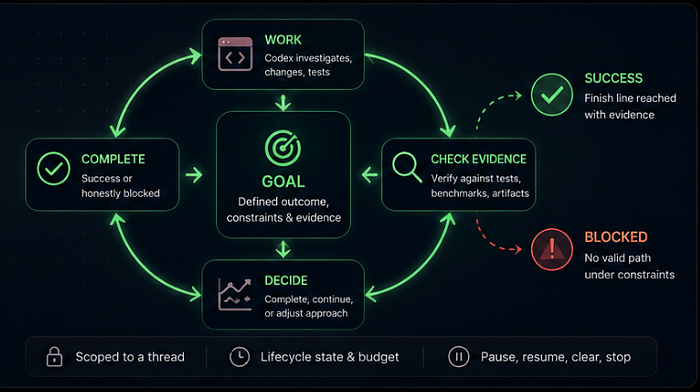
Step 1: Define the objective
You tell Codex what should happen.
Example:
/goal Reduce dashboard page load time below 2 seconds
Step 2: Codex investigates and plans
Codex may:
- Read files
- Analyze code
- Check dependencies
- Search for issues
- Plan next actions
Step 3: Execute and verify
Codex can:
- Write code
- Run tests
- Refactor functions
- Validate changes
Step 4: Complete or pause
Once conditions are met, the goal can finish.
You can also pause and resume work later.
When to Use /goal
Goals work best for tasks that require multiple steps.
Good use cases:
Performance optimization
/goal Reduce homepage loading time

Constraints:
- Keep existing UI
- Keep Lighthouse score above 90
- Target loading under 2 seconds
Finding difficult bugs
/goal Investigate memory leaks in analytics.ts

Constraints:
- Keep existing architecture
- Add tests if needed
- Clearly label uncertain findings
Writing test coverage
/goal Create unit tests for auth.ts

Constraints:
- Reach at least 90% coverage
- Do not modify business logic
Large refactoring work
/goal Refactor payment module

Constraints:
- Preserve API behavior
- Keep tests passing
- Improve readability
When NOT to Use /goal
Goals are not the right tool for every task.
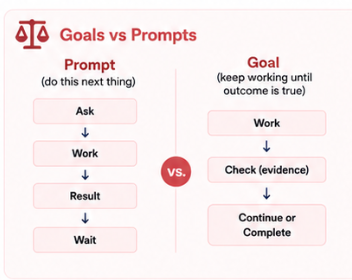
Avoid using /goal for:
- One-line edits
- Quick explanations
- Small bug fixes
- Short code reviews
- Questions with one answer
Bad example:
/goal Make this code better
Why this is bad:
"Better" has no clear finish line.
Codex may continue making changes without knowing when to stop.
Better version:
/goal Refactor user-service.ts

Constraints:
- Keep API unchanged
- Improve readability
- Keep tests passing
How to Enable /goal in Codex

Update Codex:
npm install -g @openai/codex@latest
Verify installation:
codex --version
Some Codex versions may require enabling goal-related features.
Example:
[features]
goals = true
Check available features:
codex features list
Goal Commands
Create a goal:
/goal Finish dashboard migration
Check current goal:
/goal
Pause:
/goal pause
Resume:
/goal resume
Clear:
/goal clear
Good vs Bad Goal Prompts
Bad
/goal Refactor this code and make it better
Problems:
- No measurable result
- No constraints
- No finish line
Good
/goal Optimize database queries in db.ts

Constraints:
- Keep schema unchanged
- Cover all execution paths with tests
- Target execution time below 50ms
Why it works:
- Clear objective
- Defined limits
- Measurable result
Permission and Safety Tips
Codex may ask for confirmation before actions that can change files or execute commands.
Before running long autonomous tasks:
Keep Git clean
Create a new branch:
git checkout -b codex-experiment
Commit before running goals
git add .
git commit -m "Clean starting point"
Avoid sensitive environments
Do not run autonomous tasks:
- On production systems
- With exposed secrets
- On important system folders
Best Practices
Define a clear finish line
Bad:
/goal Improve performance
Better:
/goal Reduce API response time below 150ms
Define constraints
Tell Codex what should not change.
Examples:
- Keep API unchanged
- Keep tests passing
- Do not change database schema
Do not hide uncertainty
If data may be unavailable:
If metrics cannot be collected, label results as estimated.
Use measurable targets
Examples:
- Response time under 100ms
- 95% test coverage
- Lighthouse score above 90
Common Problems and Fixes
Goal keeps running forever
Cause:
No clear finish condition.
Fix:
Add measurable success criteria.
Goal changes too much code
Cause:
Constraints are missing.
Fix:
Do not modify external APIs
Goal cannot complete
Cause:
External dependencies fail.
Fix:
Tell Codex how to handle failures.
Frequently Asked Questions
Does /goal work in every Codex version?
Not always.
Availability depends on the installed version and enabled features.
Can /goal continue working without me?
Yes.
Goals are designed for long-running tasks that continue across turns.
Can I edit a running goal?
Yes.
You can pause, resume, or modify active work.
Does /goal replace normal prompts?
No.
Normal prompts are still better for:
- Quick questions
- Explanations
- Small edits
- Fast debugging
Conclusion
The /goal command changes Codex from a prompt-response tool into a longer-running coding workflow.
Instead of repeating instructions every few minutes, you give Codex a clear objective, define constraints, and let evidence decide when work is complete.
Give it a shot and share your feedback in the comments under my YouTube video! ;)
Cheers, proflead! ;)