
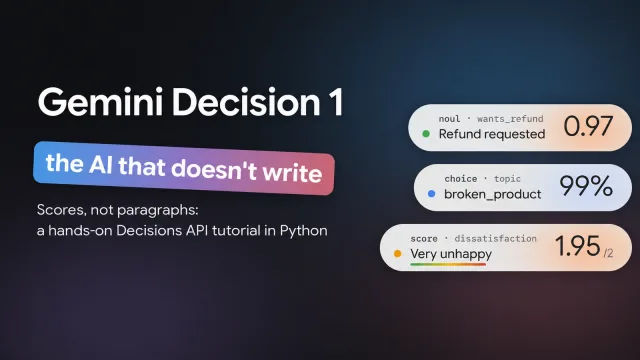

Hey devs! Google's Gemini Decision 1 returns probabilities and scores that you can use in your code. You give it some input and a few questions, then decide what to do with the results.
I tried it with three headphone reviews: one negative, one positive, and one mixed. For each review, I asked whether the customer requested a refund, what the review was about, and how dissatisfied they sounded. I'll walk you through the same example using Python.
Download the Python demo and instructions, or open demo.py. The script uses Python 3 and the standard library. You don't need to install any packages.
Watch the video walkthrough
Prefer to watch? Follow along with my Gemini Decision 1 video walkthrough.
What is Gemini Decision 1?
Gemini Decision 1 is the model. The Decisions API is the endpoint you call to use it. Google announced it on November 11, 2026.
You send one input and a set of questions with defined answers. The model scores those answers without generating a written response. Your application receives JSON containing the results.
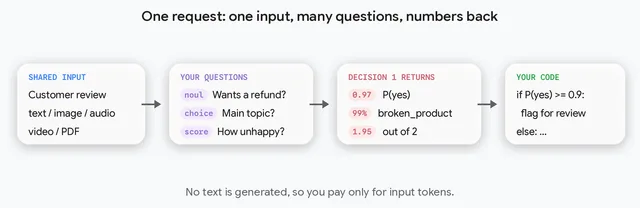
This fits tasks such as sorting support tickets, selecting a tool, or checking an answer against a rubric. It doesn't explain its choices, so use a text-generating model when you need a written explanation.
Here's the mixed review from my demo:
The sound is great, but the headband hurts after an hour. It's a little annoying, but I'm keeping them for now.
I first asked a regular Gemini model whether this customer wanted a refund. It answered with an explanation:
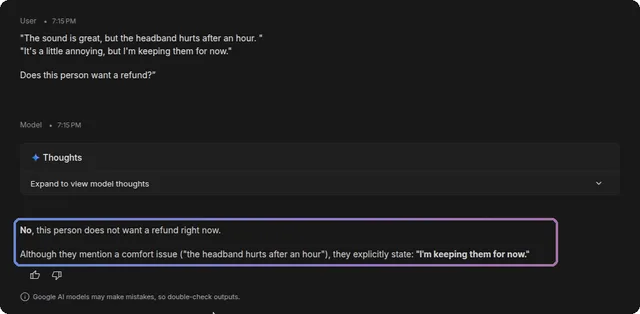
Regular models can also return structured output, including JSON. The useful difference here is that the Decisions API directly scores predefined answers and returns probabilities. In my demo, the refund question returned about 0.015, or 1.5% for yes.
1. Create an API key
Open Google AI Studio's API Keys page and choose Create API key.

Give the key a name, choose a project, and click Create key. If you don't have a project available, follow AI Studio's project setup prompts first.
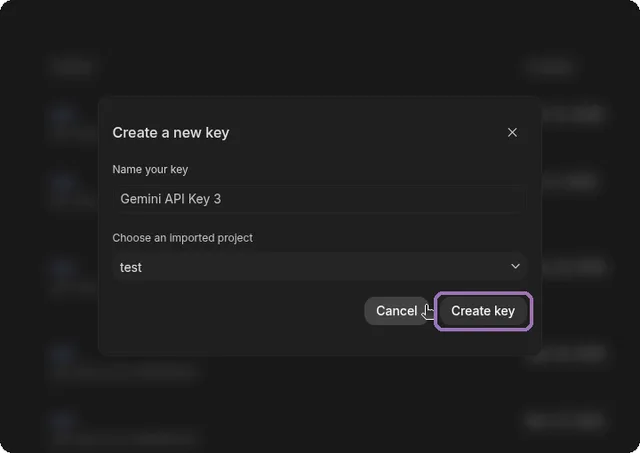
Google offers a no-cost tier for prototyping, subject to availability and quota. Check your project's billing settings before sending requests.
Extract the demo ZIP and open a terminal in the folder containing demo.py. On Linux or macOS, use Bash to enter the key without displaying it or putting its value in your command history:
read -rsp 'Gemini API key: ' GEMINI_API_KEY
printf '\n'
export GEMINI_API_KEY
Paste the key and press Enter. Keep this terminal open for the following commands. Don't put the key in the script or commit it to Git.
2. Define the questions
The script contains three example reviews:
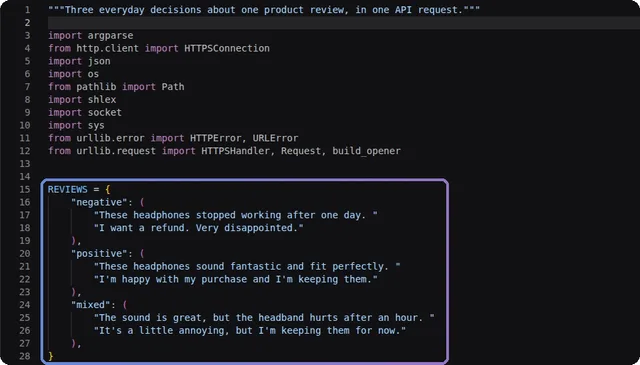
We'll use all three question types. Each question is evaluated independently against the same review, so one answer cannot depend on another answer in the same request.
Check for a refund request with noul
noul is the API's name for a yes/no question. The returned value is the estimated probability of yes. Google's documentation specifies a range of 0.01 to 0.99, so don't use a threshold of 1.0.
"wants_refund": {
    "type": "noul",
    "instructions": "Does the reviewer explicitly ask for their money back?",
}
The word explicitly matters. A customer can dislike a product without asking for a refund. This question checks what they wrote; it doesn't establish whether they're eligible for a refund.
Choose a topic with choice
For choice, give each option an ID and a description:
"topic": {
    "type": "choice",
    "instructions": (
        "What is the main topic of this review? When there is a complaint, "
        "pick its topic rather than the topic of any praise."
    ),
    "criteria": {
        "sound": "How the headphones sound.",
        "comfort": "How the headphones fit or feel when worn.",
        "broken_product": "The headphones are faulty or stopped working.",
        "other": "Another topic, or no clear topic.",
    },
}
The response includes the selected option and probabilities for every option. I added the instruction about complaints because the mixed review praises the sound but complains about comfort.
Rate dissatisfaction with score
A score question uses an ordered list of descriptions. Their positions define the numeric levels, starting at zero:
"dissatisfaction": {
    "type": "score",
    "instructions": "How much dissatisfaction does this review express?",
    "criteria": [
        "0: No dissatisfaction; the reviewer is happy.",
        "1: Mild dissatisfaction; a small complaint or annoyance.",
        "2: Strong dissatisfaction; very disappointed or angry.",
    ],
}
The returned score is a probability-weighted average of those levels. A value such as 1.04 is valid on this 0-to-2 scale. Look at the per-level probabilities too: the average alone doesn't show how the probability is distributed.
3. Send the request
The script sends a POST request containing the model name, review, and questions:
payload = {
    "model": "gemini-decision-1",
    "input": REVIEWS["negative"],
    "questions": QUESTIONS,
}

request = Request(
    "https://generativelanguage.googleapis.com/v1beta/decisions",
    data=json.dumps(payload).encode("utf-8"),
    headers={"Content-Type": "application/json", "x-goog-api-key": api_key},
    method="POST",
)
with urlopen(request, timeout=60) as response:
    result = json.load(response)
The complete downloadable script includes the imports, example reviews, questions, and error handling. Start with a dry run to inspect the payload without a key or API usage:
python3 demo.py --dry-run
Then run each example:
python3 demo.py
python3 demo.py --example positive
python3 demo.py --example mixed
Each command above makes one API request with three questions. You can also pass your own review:
python3 demo.py --text "The left speaker is buzzing. Please refund me."
If you get an authentication error, check the key in this terminal and its project. For a quota error, check the project's limits and billing. A network error means the script couldn't complete the request; the dry run can still help you check the payload.
4. Read the results
These values come from my recorded demo. They show how the response works, not how accurately the model handles customer reviews in general. Your results may differ.
Negative review
These headphones stopped working after one day. I want a refund. Very disappointed.
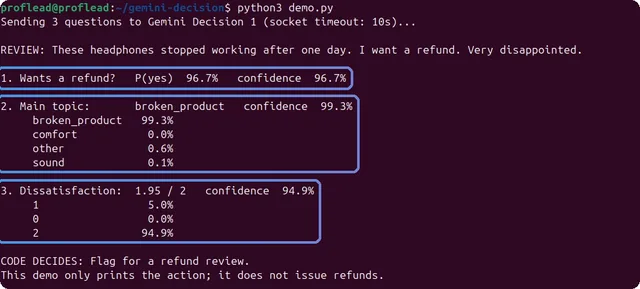
The refund probability was 96.7%, the selected topic was broken_product, and dissatisfaction was 1.95 out of 2. These results fit the explicit refund request and broken headphones.
Positive review
These headphones sound fantastic and fit perfectly. I'm happy with my purchase and I'm keeping them.
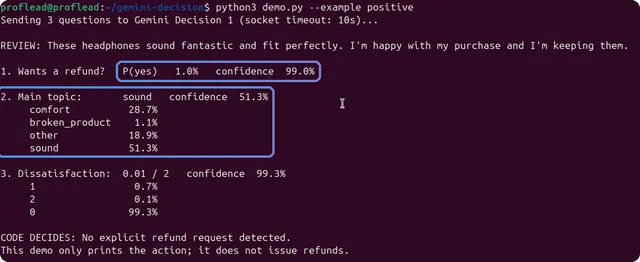
The refund probability fell to 1.0%. The topic was less clear: sound received 51.3%, while comfort received 28.7%.
The review praises both sound and fit, which could explain that split. The API doesn't provide a reason, so that's my interpretation. For a real support workflow, I'd consider adding a category for positive feedback without a complaint.
Mixed review
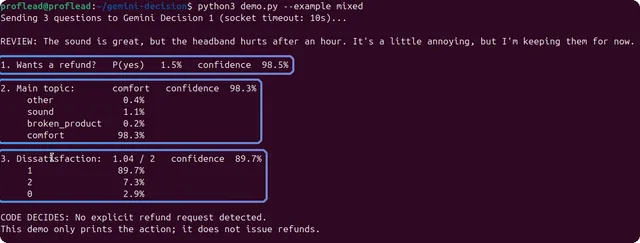
For the review about an uncomfortable headband, the model selected comfort with 98.3% confidence. Refund probability was 1.5%, and dissatisfaction was 1.04 out of 2.
| Review | Probability of refund request | Selected topic and confidence | Dissatisfaction | | --- | --- | --- | --- | | Negative | 96.7% | broken_product, 99.3% | 1.95 / 2 | | Positive | 1.0% | sound, 51.3% | 0.01 / 2 | | Mixed | 1.5% | comfort, 98.3% | 1.04 / 2 |
Probability and confidence mean different things
For the positive review, the refund answer has a 1% probability of yes and 99% confidence. Those values agree: the model assigns a high probability to no.
| Field | How to read it |
| --- | --- |
| noul | Estimated probability that the answer is yes |
| choice | Selected option ID |
| score | Probability-weighted average of rubric levels |
| confidence | Probability assigned to the most likely answer or rubric level |
For yes/no questions, confidence is max(noul, 1 - noul). For a score, it refers to the most likely rubric level, not the exact decimal average. These are model estimates, not guarantees that an answer is correct.
5. Use the refund probability in code
The demo applies two thresholds:
# Illustrative thresholds; tune these on labeled examples.
if refund["noul"] >= 0.9:
    action = "Flag for a refund review."
elif refund["noul"] <= 0.1:
    action = "No explicit refund request detected."
else:
    action = "Ask a person to check whether a refund was requested."
High-probability requests go to a refund review. Low-probability requests get a message saying no explicit request was detected. Cases in between need someone to check.
The script only prints that action. It doesn't issue a refund or connect to a payment system. The topic and dissatisfaction answers are displayed separately and don't control the refund branch.
I picked 0.9 and 0.1 for this demo. Before using them in an application, test labeled reviews from your own customers. Include complaints without refund requests, ambiguous wording, and reviews that don't fit any topic. Measure missed requests as well as incorrect flags.
Inspect the JSON and token usage
Use --json to print the complete response instead of the formatted summary:
python3 demo.py --example mixed --json
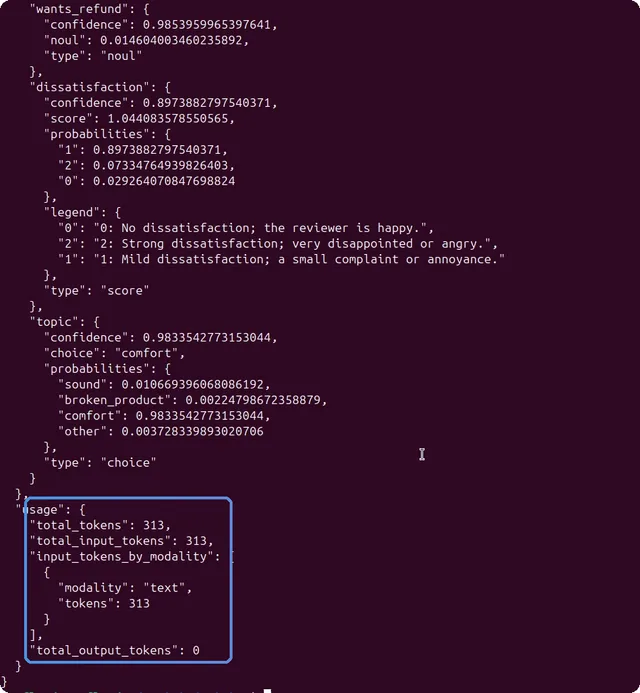
My mixed-review request used 313 input tokens and zero output tokens. At Google's published launch price of $0.10 per million input tokens, that works out to:
313 × $0.10 / 1,000,000 = $0.0000313 per request
That estimate applies to this payload. Longer reviews and more questions increase input usage. The shared input is billed once per request; question instructions and criteria add tokens. Check current pricing and quotas before estimating a production bill.
The script still decodes JSON with json.load. It doesn't need to extract a yes/no answer from generated prose.
Limits to know before using it in an app
At launch, Google describes support for text, images, audio, video, and PDFs, with up to 1,000 independent questions per request and a context limit of about 256K tokens. This tutorial only demonstrates text input.
Google reports 150–250 ms end-to-end latency for inputs up to about 16K tokens and 1–100 questions. I haven't benchmarked that claim. Your network, input size, and workload will affect the time you see.
The API is in beta. Check the current documentation for supported features and limits before building around it.
Try changing one review and one question first. Compare the result with the answer you expected, then add harder examples. That will tell you more about whether it fits your application than these three reviews alone.
For another Python project with Gemini, see my AI image analyzer tutorial.
Cheers, proflead ;)