
Watch on YouTube: Clean Code
We’ll apply principles from Robert C. Martin’s Clean Code to Python examples: clear names, focused functions, and explicit error handling.
What is a Messy Code?
Messy code, often referred to as “spaghetti code,” is characterized by its lack of organization and clarity, making it difficult to read, understand, and maintain.
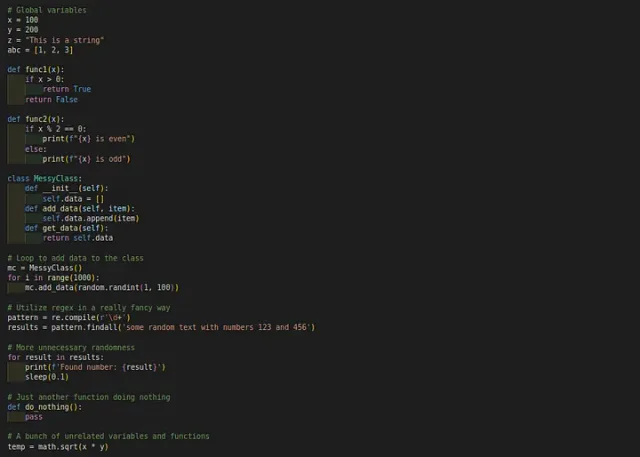
Here are some key attributes of messy code:
- Poor Naming Conventions: Variables, functions, and classes have ambiguous or non-descriptive names, making it hard to discern their purpose or functionality.
- Lack of Structure: The code lacks a coherent structure, often with functions or classes that are too long, do too many things, or are poorly organized.
- Inconsistent Formatting: Inconsistent use of indentation, spacing, and line breaks, which makes the code visually unappealing and harder to follow.
- Excessive Comments: Over-reliance on comments to explain what the code does, often because the code itself is not self-explanatory.
- Duplication: Repeated code blocks that could be consolidated, leading to redundancy and increased maintenance effort.
- Poor Error Handling: Inadequate mechanisms for handling exceptions or errors, resulting in code that is fragile and prone to crashing.
- Side Effects: Functions or methods that alter global states or variables outside their scope, leading to unpredictable behavior.
- Lack of Modularity: Code that is not broken down into reusable, independent components, making it difficult to test and reuse.
All of these often lead to errors and complicated maintenance. Let’s explore some principles from Uncle Bob’s “Clean Code” that can help you improve your code.
Python Examples of Bad-and Good Code
Meaningful Naming
For example, look at the first function. What’s f? What are x and y? We have no idea what this code does just by looking at it. Then look at the scond function. Much better, right? Clear names make it obvious what the function does, no guesswork needed.
# bad
def f(x, y):
    return x + y

# good
def calculate_sum(first_number, second_number):
    return first_number + second_number
Functions Should Do One Thing
Here’s an example where one function is doing too many things at once:
# bad
def process_numbers(numbers, file_path):
    # Calculate the sum of numbers
    total = sum(numbers)

    # Print the sum
    print(f"The sum is: {total}")

    # Save the sum to a file
    with open(file_path, 'w') as file:
        file.write(f"Sum: {total}")
    return total
This will be hard to maintain. Each responsibility is better off as its own function:
# good
def update_stock(items):
    # update stock levels
    pass
def send_confirmation(order):
    # send order confirmation
    pass
def log_order(order):
    # log the order details
    pass
Now, each function has one clear responsibility. Simple and easy to manage!
Unnecessary Comments
Sometimes, we use comments to explain code when the code itself isn’t clear. But if your code is written well, comments are often unnecessary.
# This function adds two numbers
def calculate_sum(first_number, second_number):
    return first_number + second_number
Do we really need that comment? The function name is clear enough. Let’s focus on making the code itself self-explanatory.
Error Handling
Handle expected errors explicitly so a failed operation does not leave your program in an unclear state.
Here’s an example without proper error handling:
# bad
def divide(a, b):
    return a / b
If b is zero, this will cause an error. Let’s fix it:
# good
def divide(a, b):
    try:
        return a / b
    except ZeroDivisionError:
        return "Cannot divide by zero"
Now, instead of crashing, the program returns a helpful message.
Keep Code Formatting Consistent
Formatting matters! Code that’s messy or inconsistent can be harder to read. Use consistent spacing and indentation, and avoid cramming too much into one line.
def multiply(a,b):return a*b
DRY Principle (Don’t Repeat Yourself)
Duplicate code is harder to maintain and prone to errors.
# bad
def print_dog_sound():
    print("Woof")
def print_cat_sound():
    print("Meow")
Instead of repeating similar code, we can refactor it:
# good
def print_animal_sound(animal):
    sounds = {
        'dog': 'Woof',
        'cat': 'Meow'
    }
    print(sounds.get(animal, "Unknown animal"))
Better right? :)
TDD, or Test-Driven Development
Test-Driven Development, means writing tests before writing the actual code. It ensures that your code does what it’s supposed to. By writing tests first, you create a safety net that catches issues early on.
def test_add():
    assert add(2, 3) == 5
    assert add(-1, 1) == 0
Avoid Side Effects
Side effects occur when a function modifies some state outside its local environment or has an observable interaction with the outside world beyond its primary purpose.
# bad
total = 0
def add_to_total(value):
    global total
    total += value
    return total
print(add_to_total(5))  # Output: 5
print(add_to_total(3))  # Output: 8
This function modifies a global variable, which is a side effect. Let’s fix it.
# good
def add_numbers(a, b):
    return a + b

total = 0
total = add_numbers(total, 5)
print(total)  # Output: 5
total = add_numbers(total, 3)
print(total)  # Output: 8
This function returns a result without modifying any external state.
Command Query Separation
This principle states that every method should either be a command that performs an action, or a query that returns data to the caller, but not both.
Look at this example:
# bad
class Stack:
    def __init__(self):
        self.items = []
    def pop_and_return_size(self):
        self.items.pop()
        return len(self.items)

pystack = Stack()
stack.items = [1, 2, 3]
size = stack.pop_and_return_size()
print(size)  # Output: 2
The “pop_and_return_size” method modifies the stack (command) and returns a value (query). Let’s fix it.
# good
class Stack:
    def __init__(self):
        self.items = []
def pop(self):
    return self.items.pop()

def size(self):
    return len(self.items)

stack = Stack()
stack.items = [1, 2, 3]
stack.pop()
size = stack.size()
print(size)  # Output: 2
Here, pop() is a command, and size() is a query.
Conclusion
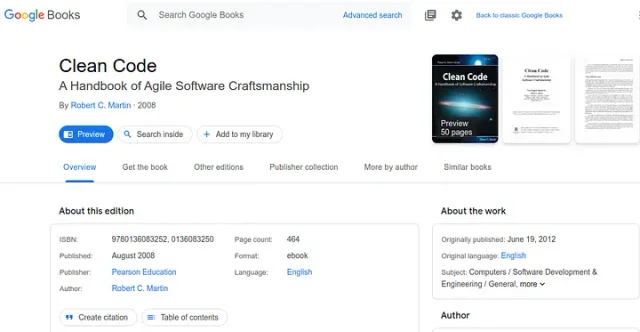
By avoiding common mistakes like using vague names, writing long functions, neglecting error handling, and duplicating code, you can make your code cleaner and more maintainable. For more in-depth advice, I highly recommend reading “Clean Code”.
For more reading on refactoring, debugging, and software design, see my developer book list.
Clear names and focused functions make code easier to read, debug, and share. They also help when you return to a project months later.
Try applying one of these principles to a function in your own project, then check whether the result is easier to follow.
Thank you for reading, and happy coding! :)