
Earlier this year, engineers at Anthropic were approving each other’s pull requests after little more than a skim, trading quick approvals to get through the queue. Claude could write code faster than people could review it.
Their fix wasn’t just “add an AI reviewer.” Before they trusted the reviewer, they tested it on bugs that had already hurt them. On the Claude Code repositories, merged pull requests more than doubled from June to September, and the share they had to undo dropped by more than 40%.
This guide turns that approach into steps you can follow, even if you’ve never set up code review before. I used Anthropic’s November 18 webinar with Morgan Lunt and Qing Wang and the team’s engineering write-up, both linked below. The contact-import experiment is my own.
A few words first
If you’re new to this, here are the terms used in this guide:
- Pull request (PR): a request that says “here’s a change I made, please check it and add it to the main code.”
- Code review: someone (or something) reads the change and looks for mistakes before it’s accepted.
- Merge: the change is accepted and becomes part of the main code.
- Revert or rollback: undoing a change after it was merged, because it broke something.
- Incident: a bug that reached real users and caused a real problem.
- Eval: a test for an AI. You give it cases where you already know the right answer, and you count how often it gets them right.
Step 1: Check your own work before you open a pull request
The cheapest bug to fix is the one nobody else has seen yet.
- When Claude Code writes a change for you, ask it to run the tests and fix anything that fails. Tests are small programs that check your code does what it should.
- Then type
/code-reviewin Claude Code. It’s a quick AI review of your current changes that runs while you work.
In the webinar, Morgan showed Claude adding a date filter, running the tests, seeing one fail, and fixing it in the same session. Then a helper agent with a fresh memory took a second look before any pull request existed.
Step 2: Let AI review every pull request
You have two options:
- Hosted Code Review (Claude Team and Enterprise plans). An organization owner installs the Claude GitHub App and chooses which repositories to review. To review each new pull request automatically, select the trigger that runs when a PR opens. Anthropic says most reviews take about 6–10 minutes. Admins set each repo to Quick, Standard or Deep, and the webinar gave a rough range of $5–$25 per review depending on that depth.
/code-review ultrain Claude Code. Launch a deeper cloud review from your terminal. This requires an eligible Claude account.
The quick /code-review is for while you’re working. You can run the deeper review before opening a pull request or point it at an existing one.
Step 3: Read the findings the right way
Anthropic’s reviewer isn’t one bot with opinions. Several “finder” agents look for problems in parallel, then “verifier” agents try to prove each finding wrong. Only what survives gets ranked, deduplicated and posted on the pull request.
Anthropic’s team uses three labels. Its engineers fix a finding or resolve the thread with a reason. Your repository’s merge policy determines which checks block a merge.
| Label | What it means | What you do |
|---|---|---|
| Important | A real bug | Check the finding and fix confirmed bugs before merging. |
| Nit | A small improvement | Address it or explain why you are skipping it. |
| Pre-existing | A real bug that was already there before your change | Not your change’s fault. Note it and fix it separately. |
When Anthropic launched the reviewer internally, the share of its pull requests getting a substantive review comment went from 16% to 54%. That figure counts PRs with a substantive comment. It doesn’t tell us how many bugs each reviewer missed.
Step 4: Don’t let review go on forever
If you keep asking an AI to find problems, it will keep finding smaller and smaller ones. One Anthropic pull request went through more than 50 rounds of review and fixes before its author stopped it.
Three changes helped:
- Later rounds only review what changed since the last round.
- Findings that were already posted aren’t repeated.
- After three rounds, the reviewer asks the author to step back.
For you: if you’re on round three and still getting new findings, stop. The change is probably too big, or the goal wasn’t clear. Split it up or rethink it.
Step 5: Write two small instruction files
Put these files in the main folder of your repository.
CLAUDE.md holds rules for everyone who works on the code, people or AI:
We use TypeScript.
Every new function needs a test.
REVIEW.md tells the hosted Code Review service what matters, what to skip, and what the code alone can’t tell it. Put these rules on the base branch for hosted reviews. The ordinary local /code-review command uses CLAUDE.md. In the prompt-based experiment below, I pass the review rules explicitly.
# Review instructions

Import jobs are retried after a timeout, and a retry can resubmit the same batch.
Flag any change that could save the same record twice.
Don't comment on formatting. Our linter already checks it.
Ignore files in /generated.
The most useful lines describe things the diff can’t show. That’s exactly what my test below found.
Step 6: Test your reviewer on a bug you already had
Anthropic built a test set from PRs that caused incidents and the changes that fixed them. The team runs its reviewer against those cases daily to see which bugs it still misses. Each test case is tiny: which change caused the incident, where the bug is, and the answer in one sentence.
You can start with one case.
1. Pick your bug
Take the last change your team had to roll back. Write down, in one sentence, what a good reviewer should have said.
My example is a contact importer. If an import times out and gets retried with the same batch, the same contact is stored twice:
export function importContacts(store, batch) {
  for (const contact of batch) {
    store.add(contact);
  }
}
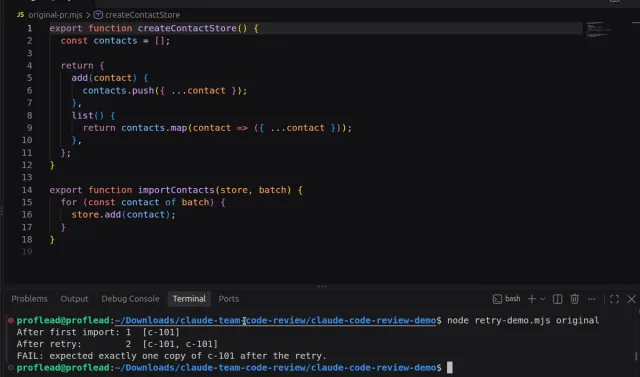
My one-sentence answer: “A retried import adds the same contact again, so one contact ID gets two records.”
2. Save two review prompts
Make one prompt file with the broken change and one with the fix. Each prompt is a short request (“Review this pull request for correctness…”), a one-line PR description, and the diff. Write it the way a real pull request looks. Don’t mention the bug.
3. Run each one five times
Save the two prompts as original.txt and fixed.txt in ~/prompts. Put the review instructions you want to test in that same directory as REVIEW.md. Leave the retry requirement out of both PR descriptions. Use the same model and settings throughout the comparison.
With the Claude CLI installed and signed in, run this in Bash. Each call starts a fresh session. The prompts and results stay outside its empty working folder. Passing the rule before the PR text matches how my demo supplied it. The comparison makes 20 review calls.
(
  set -eu
  prompts="$HOME/prompts"
  results=$(mktemp -d)
  cd "$(mktemp -d)"
  printf 'Review outputs: %s\n' "$results"

  for change in original fixed; do
    {
      cat "$prompts/REVIEW.md"
      printf '\n\n'
      cat "$prompts/$change.txt"
    } > "$results/$change-prompt.txt"

    for run in 1 2 3 4 5; do
      claude -p --tools "" < "$prompts/$change.txt" > "$results/$change-baseline-$run.md"
      claude -p --tools "" < "$results/$change-prompt.txt" > "$results/$change-with-rule-$run.md"
    done
  done
)
4. Score it
Open the results and check each answer against the bug you wrote down. Score only completed reviews.
- Original change: In how many of the five runs did the reviewer explain how a retry creates a duplicate? This measures how consistently it catches this particular bug.
- Fixed change: In how many runs did it still report the retry bug? That’s the false-alarm count for this fix. To measure precision, you would need to check all reported findings and count what fraction were correct.
You need both numbers. As Morgan put it, a reviewer that prints hundreds of findings will eventually hit every bug, but that’s just noise.
What happened when I did this
My reviewer was a plain Claude prompt run with claude -p, not Anthropic’s Code Review product, so this tests my setup, not theirs.
| My test | Without REVIEW.md | With REVIEW.md |
|---|---|---|
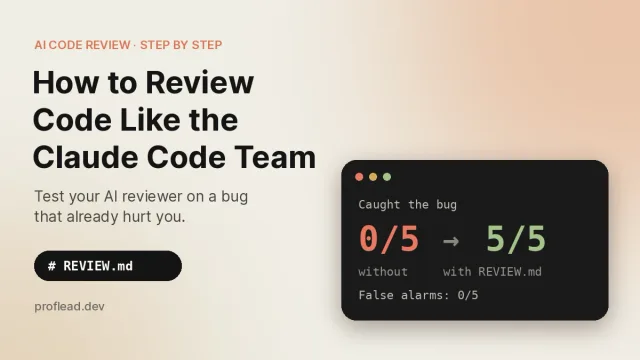
| Original change: caught the bug | 0 / 5 | 5 / 5 |
| Fixed change: false alarm | 0 / 5 | 0 / 5 |

Without REVIEW.md, the reviewer said “No correctness findings” all five times. One review even noticed that the function doesn’t remove duplicates, and then decided that wasn’t a bug because nothing in the pull request asked for it. The reviewer could see the problem. It just didn’t know that my imports get retried.
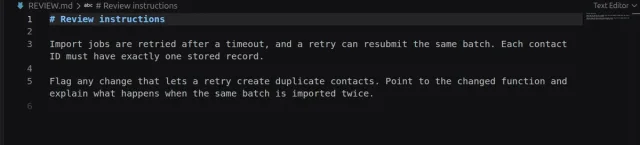
Then my runner prepended the contents of a short REVIEW.md to each prompt. It says that imports get retried, that each contact ID must have one stored record, and that the reviewer should flag any change that lets a retry create duplicates. With that, it caught the bug five out of five times and raised zero false alarms about duplicate contacts on the fix.

When my prompt mentioned retries directly, it caught the bug every time, even without REVIEW.md. So the model was able to find this bug. It was missing context.
That’s one case, so it doesn’t prove the rule works everywhere. But now I know something I wouldn’t have known otherwise, and I learned it before it cost me a rollback.
Step 7: When the reviewer is wrong, teach it
- If a finding is wrong, reply on the pull request and say why: “This isn’t a bug, because…”
- Once a week, read those replies and turn them into lines in REVIEW.md.
Anthropic automates this with a weekly routine that reads comments where people disagreed with the reviewer and suggests REVIEW.md updates. Doing it by hand works fine when you’re starting out.
Step 8: Decide when a person still has to look
AI review doesn’t mean no people. It means people look where it matters. Anthropic’s goal was for most pull requests to merge with zero or one human involved, usually the person who asked Claude for the change, with no increase in reverts or incidents.
| Risk | Example | Who approves |
|---|---|---|
| Low | A typo in the docs | AI review and automatic checks are enough |
| Medium | A new filter on an orders page | One person |
| High | Critical billing or release paths that owners designate for two approvals | Two people |
Anthropic’s five rules behind these tiers:
- The tier comes from what the change touches. A classifier reads the change, and code owners decide what’s sensitive.
- Sensitive areas always need a person.
- Lighter rules are only for trusted authors. Anyone else gets a full human review.
- An agent’s approval never counts as a person’s.
- The person who asked for the change is responsible for it.
Step 9: Keep your safety net
The AI reviewer is one layer out of six in Anthropic’s process: checking work before the pull request, AI review, a separate security review, automatic CI checks, risk-based human approval, and a careful rollout. They also use feature flags, so a broken feature can be switched off within minutes without changing any code.
For a small team, that means:
- Automatic tests that run on every change
- Small pull requests, which are easier to review and easier to undo
- A fast way to undo a bad change
Your first week
- Run
/code-reviewbefore you open your next pull request - Add a
REVIEW.mdwith three lines about what matters in your project, especially what the diff can’t show - Test your reviewer on your last rollback: five runs on the bug, five on the fix
- Add one REVIEW.md line based on what you learned
- Agree with your team which changes still need a second person
Don’t trust an AI reviewer because it sounds smart. Trust it because you tested it on your own bugs and it passed.
Sources
- How the Claude Code team does code review, Anthropic’s write-up on the claude.dev blog, October 15, 2026
- Code Review is now generally available, Anthropic, October 15, 2026
- How the Claude Code team does code review, Anthropic webinar, November 18, 2026
- Hosted Code Review and local review commands, Claude Code documentation