Watch on YouTube: ChatGPT Work vs Chat vs Codex
OpenAI now gives us three different ways to get things done: Chat, ChatGPT Work, and Codex.
Chat is easy to understand. You ask a question and get an answer.
Work and Codex are more confusing. Both can work with files. Both can use tools. Both can handle long, multi-step tasks. Codex can create documents and spreadsheets, while Work can run code and work with repositories.
So, where is the real difference?
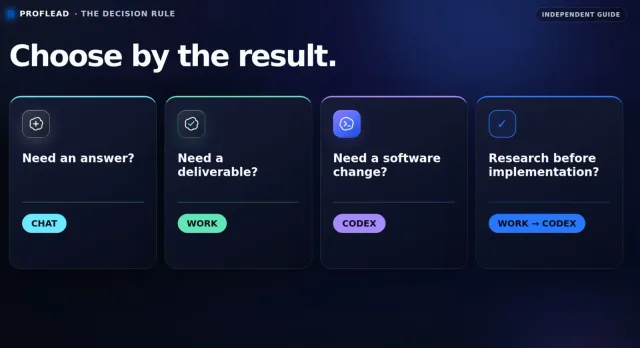
Here is the simplest way I explain it:
Chat = answers
Work = outcomes
Codex = software
This is not a hard technical limit. There is a lot of overlap. It is a practical rule that helps you choose the best starting point.
In this guide, I will explain what each mode is designed for, show a real Work-to-Codex workflow, and help you decide which one to use for your next task.
Note: OpenAI is developing these products quickly. Features can depend on your plan, operating system, region, workspace settings, and rollout status. This article reflects the product experience and official documentation available in August 2026.
Chat vs Work vs Codex: the quick answer
Chat: answers and conversation
Use Chat when you need an explanation, idea, short draft, summary, comparison, or help with a decision. The typical result is an answer you continue discussing in the conversation.
ChatGPT Work: finished outcomes
Use Work when the task needs multiple steps, sources, tools, or connected deliverables. The typical result is a report, presentation, spreadsheet, PDF, analysis, workflow, or recurring update that you can review and reuse.
Codex: software changes
Use Codex when the main object of the task is a repository, feature, bug, test, refactor, migration, or pull request. The typical result is a reviewed software change, including edited files, commands, tests, and a diff.
The fastest way to choose is to ask what you want to review at the end: an answer, a finished deliverable, or a software change.
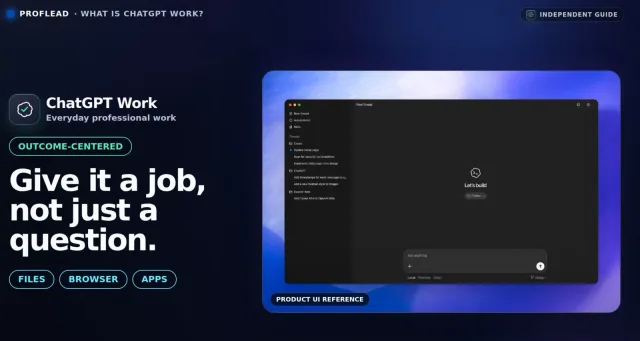
OpenAI describes ChatGPT Work as a way to delegate real work with a clear outcome. It can gather information, use files and connected tools, create finished files, and show its progress while you review or redirect it. Official ChatGPT Work guide
OpenAI defines Codex as its coding agent for software development tasks. It is available through several surfaces, including the desktop app, terminal, IDE extension, web, and cloud. Official OpenAI glossary
What is regular Chat?
Use Chat when the main thing you need is an answer or a conversation.
Good Chat tasks include:
- Explain a technical concept in simple English.
- Improve a short email.
- Brainstorm names for a product.
- Summarize an attached file.
- Compare two options.
- Help you think through a decision.
- Draft a short social post.
Chat can still use files, search, and other tools when they are available. The difference is your intention. You are mainly asking ChatGPT to respond, explain, or help you think—not to manage a larger job and return a complete package of deliverables.
For example:
Explain the difference between unit tests and integration tests.
Use a simple example for a beginner.
This is a Chat task. There is no need to start a longer agentic workflow for a question that may take only a few minutes to answer.
OpenAI recommends Chat for questions, explanations, brainstorming, short drafts, summaries, comparisons, and clarifying a larger task. Official guide to using ChatGPT
What is ChatGPT Work?
ChatGPT Work is for jobs with a clear, reviewable outcome.
Instead of asking only for an answer, you delegate a task. Work can plan the process, gather context, use tools, move through several steps, and create a result you can review.
Good Work tasks include:
- Research a market and create a report.
- Compare vendors and produce a scored spreadsheet.
- Turn meeting notes into decisions, owners, and deadlines.
- Create a presentation from several documents.
- Analyze data and prepare a management summary.
- Build a recurring weekly update from connected sources.
- Create several files that must agree with one another.
This is why I do not describe Work as “Chat, but longer.” The important change is not only the length of the response. It is the type of responsibility you give it.
In Chat, you often ask:
“What should I include in a competitor analysis?”
In Work, you ask:
“Complete the competitor analysis, create the spreadsheet and presentation, check the sources, and return the files for my review.”
According to OpenAI, Work is a good fit when a task uses multiple sources or tools, would take meaningful time to complete manually, produces something you will reuse, or needs to be repeated over time. Getting started with ChatGPT Work
Work locally vs cloud Work
ChatGPT Work can run in different environments. The right choice depends on where the required files and tools are located.
Use Work locally when:
- The task needs files stored on your computer.
- ChatGPT needs to work with local apps.
- The task needs a browser session or other local context.
- You want to keep the work tied to your current computer.
Local Work is available in the desktop app when it is enabled for your account or workspace.
Use cloud Work when:
- The task should continue after you close the desktop app.
- You want to continue the conversation from web or mobile.
- The task uses uploaded files and connected tools.
- You want to run a scheduled or recurring task without keeping your computer awake.
On the web, Work runs in a managed cloud environment. OpenAI explains that cloud Work can continue after the desktop app is closed, while local Work is intended for tasks that need files or apps on your computer. Official local and cloud Work explanation
This distinction matters. “Local” and “cloud” do not describe the quality of the answer. They describe where the task runs and what it can access.
A real ChatGPT Work example: creating three connected deliverables
In my video, I gave ChatGPT Work one larger job: prepare a beginner-friendly comparison of ChatGPT Work and Codex.
I asked for three deliverables:
- A detailed comparison spreadsheet.
- A one-page video brief.
- A five-slide presentation.
I also provided source material and added an important final instruction:
Before finishing, check that the spreadsheet, brief, and presentation agree with one another.
Here is a cleaned-up version of the prompt:
Help me prepare a beginner-friendly comparison of ChatGPT Work and Codex.

Use the attached channel brief and the official OpenAI sources I provide.

Create three deliverables:

1. A comparison spreadsheet covering purpose, best tasks, inputs,
   outputs, local and cloud use, approvals, limitations, and when
   to choose each mode.
2. A one-page video brief with the main recommendation, three
   practical examples, and the most important points of confusion.
3. A five-slide presentation summarizing the comparison.

Separate verified facts from your interpretation. Add source links
for factual claims. Flag anything you cannot confirm instead of guessing.

Before finishing, check that the spreadsheet, brief, and presentation
agree with one another.
I did not tell Work every button to click or every step to follow. I gave it:
- The goal.
- The context.
- The required outputs.
- The source rules.
- The boundaries.
- The final quality check.
That is usually a better way to delegate a large task.
Work then decided how to organize the process and which available skills or tools it needed. I could follow the progress, add information, change direction, or answer questions while it was working.
In my example, the task took around 13 minutes and returned all three requested files: an Excel spreadsheet, a Word document, and a PowerPoint presentation.
The important point was not only that ChatGPT generated three files. It treated them as one connected job.
OpenAI’s file workflow supports creating and refining documents, presentations, spreadsheets, and PDFs. You can review the output and request focused changes to a particular slide, sheet, table, or section. Official guide to working with files
What is Codex?
Codex is OpenAI’s coding agent.
You give it access to a software project and explain what you want to change. Codex can inspect the codebase, edit files, run commands, use development tools, test the result, and show you what changed.
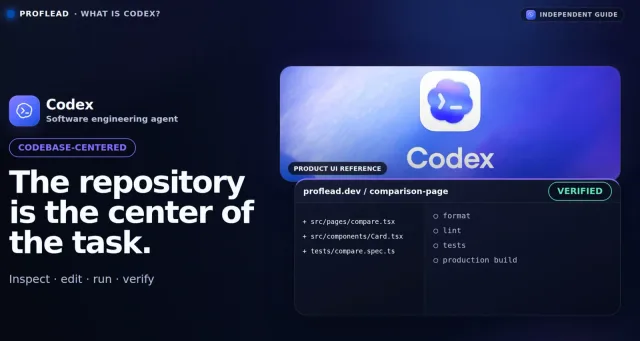
Use Codex when the main object of the task is:
- A repository.
- A feature.
- A bug.
- A failing test.
- A refactor.
- A migration.
- A pull request.
- A development environment.
You can use Codex in several places:
- The ChatGPT desktop app.
- A code editor through the Codex IDE extension.
- The terminal through Codex CLI.
- Codex on the web or in the cloud.
- Other supported integrations and development workflows.
The interface matters because it changes what is easy to inspect. Codex can show technical details such as commands, file changes, diffs, Git context, and review information. ChatGPT Work generally presents the job in less technical language and focuses more on the finished output. Official ChatGPT Work and Codex comparison
When you start Codex inside a repository, the repository becomes the center of the task. Codex works with the current files, dependencies, commands, tests, and project instructions. That makes it a natural place for implementation work.
The Codex CLI, for example, is designed to start inside a project directory so you can explore unfamiliar code, plan a change, edit files, run local development tools, and inspect commands and diffs as the task progresses. Official Codex CLI documentation
Can Codex do non-coding work?
Yes.
This is where many comparisons become misleading.
Codex can read sources, research information, create Markdown files, work with data, and generate documents, spreadsheets, presentations, or other project assets when the right tools are available.
OpenAI explicitly says that ChatGPT Work and Codex have overlapping capabilities. If you already prefer Codex, you can continue using it for research, documents, presentations, and other knowledge work. Official comparison
ChatGPT Work can also run code, inspect files, review technical work, and work with repositories it can access.
So the choice is not based on what is technically possible.
The better question is:
What is at the center of this task?
If the center is a report, deck, spreadsheet, research package, or business workflow, start with Work.
If the center is a codebase and the result must be implemented, tested, and reviewed as software, start with Codex.
A real Codex example: publishing the comparison as a blog post
After Work created the research package, I wanted to publish the comparison on my real website in the same format as my other articles.
At that point, the center of the task changed.
It was no longer only about creating a document. The agent needed to:
- Understand an existing codebase.
- Follow the current Markdown and front-matter conventions.
- Turn the approved guide into a complete blog post.
- Add a suitable local cover image.
- Reuse the existing post route instead of creating a one-off page.
- Run the relevant content generators and build checks.
- Show me the repository changes.
That is a Codex task.
I opened the project in Visual Studio Code and used Codex through the IDE. I also gave Codex the approved output from the previous Work task as context.
A prompt for this stage could look like this:
Use the attached comparison guide to create a new blog post on this website.

First inspect the existing post structure, front matter, Markdown style,
asset folders, and content generators. Reuse those patterns.

The post should explain Chat, ChatGPT Work, and Codex, include practical
examples, embed the related video, and work well on desktop and mobile.

Do not create a standalone page or change unrelated dependencies.

After implementation:

- Run the relevant content generators, type check, and build.
- Report any assumptions or limitations.
- Summarize the files you changed.
- Explain how I can review the post locally.
Codex inspected the project, converted the guide into a Markdown post, added the required metadata and cover asset, and produced a result I could review through the existing blog route.
For this stage, Codex was the obvious choice. The work had moved from research and deliverables to repository-aware implementation.
ChatGPT Work vs Codex: detailed comparison
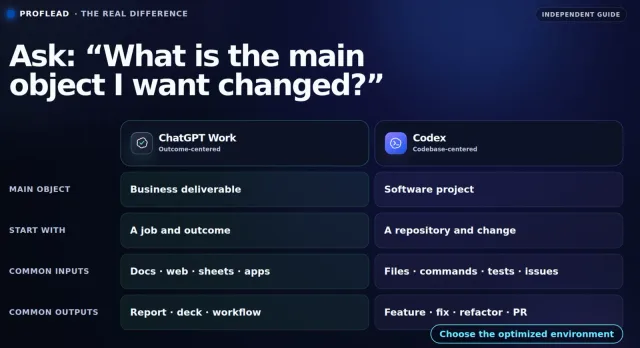
Focus and starting context
- ChatGPT Work: Starts with a goal, source material, connected tools, and required deliverables. Its main focus is finished, reviewable work.
- Codex: Starts with a repository, development environment, issue, or specification. Its main focus is software development.
Typical tasks and outputs
- ChatGPT Work: Research, analysis, reports, presentations, spreadsheets, PDFs, recurring updates, and workflows. The result is usually a business or knowledge-work deliverable.
- Codex: Features, bugs, refactors, migrations, tests, code review, and pull requests. The result is usually a working change to a software project.
Review experience
- ChatGPT Work: Emphasizes finished outputs and gives you a natural way to preview and refine documents, presentations, spreadsheets, and PDFs.
- Codex: Exposes implementation details such as commands, file changes, diffs, Git context, tests, and developer review views.
Local and cloud use
- ChatGPT Work: Desktop Work can use local files, apps, and browser context when available. Cloud Work is useful for uploaded files, connected tools, scheduled jobs, and tasks that should continue after the computer is closed.
- Codex: The desktop app, CLI, and IDE extension can work directly with local projects. Codex cloud can handle delegated coding work in configured repository environments.
Capability overlap
Both can work with files and code. Both can complete non-coding tasks when the necessary tools are available. The practical difference is the review surface: Work centers the deliverable, while Codex centers the codebase and development loop.
The best workflow may use both
You do not always need to choose one mode for the entire project.
For many real projects, the strongest workflow is:
- Use Chat to explore the idea and clarify the problem.
- Use Work to research, compare options, and create an approved specification.
- Review the result yourself and make the important decisions.
- Give the approved specification to Codex.
- Use Codex to implement the change, run tests, and show the diff.
- Review the software before you merge or release it.
For example, imagine you want to build a new onboarding flow.
Work can:
- Research common onboarding problems.
- Analyze customer feedback.
- Compare competitor flows.
- Create requirements and acceptance criteria.
- Prepare a presentation for stakeholders.
Codex can then:
- Inspect your existing application.
- Implement the approved flow.
- Reuse your current design system.
- Add tests.
- Run checks.
- Prepare the code for review.
This handoff is much clearer than asking one agent to research, make product decisions, implement code, and ship everything without review.
Five common scenarios and the mode I would choose
1. You need to understand a technical concept
Use Chat.
You need an explanation, not a long-running workflow.
Example:
Explain vector databases for a web developer who has never used one.
Give me one practical example and explain when I do not need one.
2. You need a weekly project report from several sources
Use Work.
The task may need meeting notes, Slack updates, documents, and spreadsheet data. The result is a reusable report with decisions, owners, blockers, and next steps.
3. You need to fix a bug or add a feature
Use Codex.
The repository, implementation, and verification are at the center of the task.
4. You need to research a product idea and then build it
Use Work and Codex together.
Let Work research the problem and create a decision package. Review and approve the requirements. Then pass the approved specification to Codex for implementation and testing.
5. You need to analyze data
Choose based on the final result.
- Use Chat for a quick explanation of a small table or metric.
- Use Work when you need a complete analysis, charts, a spreadsheet, and an executive report.
- Use Codex when the analysis must live in a repository as reproducible SQL, Python scripts, tests, or a data pipeline.
How to write a better prompt for ChatGPT Work
A strong Work prompt should explain the job, not every mouse click.
Include these six parts:
- Goal: What should be completed?
- Context: Why do you need it and who is it for?
- Sources: Which files, websites, or connected tools should it use?
- Deliverables: What exact files or outputs should it create?
- Boundaries: What should it avoid? Which actions need approval?
- Quality checks: How should it verify the result before finishing?
A reusable template:
Help me complete [job].

Context:
[Audience, purpose, and important background]

Use:
[Files, sources, projects, or connected tools]

Create:
[Exact deliverables, formats, and structure]

Requirements:
[What must be included]

Boundaries:
[What it must not change, publish, send, or assume]

Before finishing:
[Checks it should perform and anything it should flag for review]
OpenAI recommends giving Work a clear outcome, source materials, expected format, and review criteria. Official prompting examples for Work
How to write a better prompt for Codex
A strong Codex prompt should describe both the intended change and how you want it verified.
Include:
- The problem or feature.
- The expected behavior.
- Relevant project constraints.
- What should remain unchanged.
- The tests or checks you expect.
- The final summary you want from Codex.
A reusable template:
Implement [change] in this repository.

Expected behavior:
[Describe what the user or system should be able to do]

Constraints:
[Framework, architecture, compatibility, security, or style requirements]

Before editing, inspect the existing implementation and reuse current
patterns where possible. Do not change unrelated files.

After implementation:

- Run the relevant tests, linting, and build checks.
- Report anything you could not verify.
- Summarize the files changed and the main decisions.
- Show me how to review the result.
Common mistakes
Treating Work as a one-click magic button
Work can complete larger tasks, but it still needs a clear goal, useful context, and review criteria. A vague request usually produces a vague result.
Using Work for every small question
If you only need a short explanation or quick edit, Chat is simpler and faster.
Using Chat for a job with many connected deliverables
You can build a report or presentation through many Chat messages, but you may spend more time manually coordinating the task. Work is designed to carry a larger job through to a reviewable outcome.
Choosing Codex only because the task sounds “technical”
A technical topic does not automatically make something a Codex task. If you need a technical report or presentation, Work may still be the better starting point. Choose Codex when the codebase and implementation are central.
Giving Codex a research draft without approving it
Do not let a rough research output silently become a product decision. Review the requirements before implementation, especially when the change affects users, security, payments, data, or production systems.
Skipping the final review
Chat, Work, and Codex can all make mistakes. Check factual claims, calculations, files, code changes, tests, and consequential actions before you use, share, merge, or publish the result.
OpenAI also recommends reviewing consequential actions before approval and checking the final result before using or sharing it. Official ChatGPT guidance
Frequently asked questions
Is ChatGPT Work just a longer version of Chat?
No. The main difference is the goal. Chat is optimized for an answer or conversation. Work is designed to plan and complete a larger task with a clear, reviewable outcome.
Is ChatGPT Work the same as Codex?
No, but they overlap significantly. Work is designed around everyday professional tasks and finished deliverables. Codex is designed around software development and provides a more technical, repository-focused experience.
Does ChatGPT Work use Codex?
OpenAI says Work and Codex share core capabilities, but its public guidance focuses on the different experiences rather than promising that every Work task uses the same underlying model or runtime as Codex. It is safer to describe them as closely related, overlapping agent experiences—not as identical products.
Can Codex create a spreadsheet or presentation?
Yes, when the necessary tools are available. Codex can handle non-coding tasks and create project files. However, ChatGPT Work provides a more natural experience for creating, previewing, and refining business-style deliverables.
Can ChatGPT Work edit code?
Yes. Work can run code, inspect files, review technical work, and work with accessible repositories. Codex is still the better default when implementation, testing, diffs, Git, and pull requests are central to the task.
Should developers use only Codex?
Not necessarily. Developers also write proposals, compare tools, analyze feedback, prepare talks, and create technical reports. Work can be a better fit for those deliverables. Use Codex when the job moves into the repository.
Should I use local or cloud Work?
Use local Work when the task needs files, apps, or browser context on your computer. Use cloud Work when you want the task to continue after closing the app, use connected cloud tools, or run on a schedule.
Which mode should I choose if I am still unsure?
Ask yourself one question:
What do I want to review at the end?
- If it is an answer, use Chat.
- If it is a finished deliverable, use Work.
- If it is a software change, use Codex.
Final recommendation
You do not need a perfect boundary between Chat, Work, and Codex.
Use this simple rule:
Chat = answers
Work = outcomes
Codex = software
Start with Chat when you need to understand or discuss something.
Move to Work when you have a clear job with several steps, sources, tools, or deliverables.
Use Codex when the repository becomes the center of the work and the result must be implemented and verified as software.
And when a project includes both research and implementation, use Work and Codex together. Let Work prepare the decision. Review it. Then let Codex build the approved result.
For a complete walkthrough, including my Work and Codex demonstrations, watch the video on YouTube.
How do you decide between Chat, Work, and Codex? Let me know in the comments.