# How to Learn Python Effectively: 8-Week Learning Plan (80/20 Rule)
An eight-week Python learning plan with videos, articles, exercises, and a downloadable progress tracker.
Author: Vladislav Guzey
Published: 2024-03-14
Canonical: https://proflead.dev/posts/how-to-learn-python-effectively/
I know it can be hard to learn a new programming language. In this article, I want to share my plan with you. It's a way to learn Python in eight weeks using videos, articles, and practice exercises. Exercises are very important because I think the best way to learn is by doing them.
I've created this learning plan for people who don't have much free time. You only need about 30-50 minutes a day and consistency. In my plan, I use the 80/20 principle, which will help you learn the most important things first and improve the rest through practice.
As you work through the exercises, practice [writing readable Python functions and names](/posts/clean-code-stop-writing-bad-python-code/). When you are ready for a larger project, try the [Python and Gemini chatbot tutorial](/posts/ai-chatbot-using-python-and-gemini-api/).
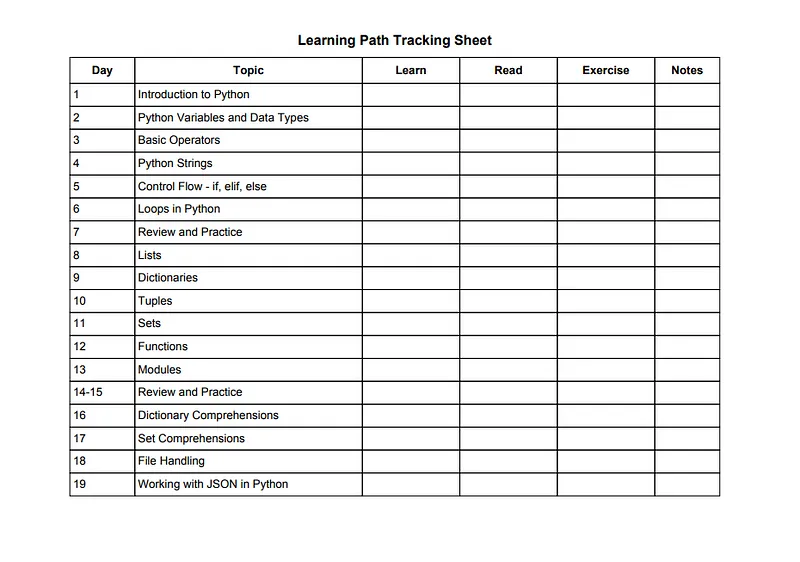
A downloadable learning tracker is included at the end of the plan.
## Why You Should Learn Python
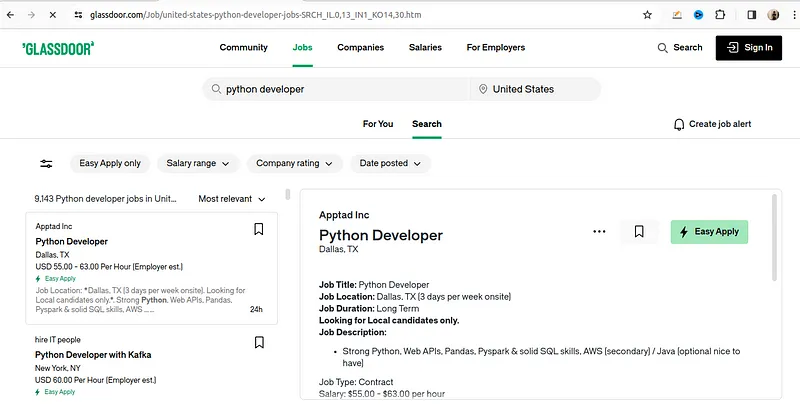
Python is a very popular programming language. People use it for web development, data science, artificial intelligence, scientific computing, cybersecurity, and more.
Python's syntax is simple and easy to understand, which makes it a great choice for beginners. Its simplicity helps newcomers learn the language quickly.
Another important thing is career opportunities. Learning Python can lead to many job options in software development, data analysis, AI, machine learning, and more.
## What is the 80/20 Principle
The 80/20 principle, also called the Pareto Principle, is a rule that says 80% of the results come from 20% of the efforts. If you learn the 20% of Python concepts that are most important and used the most, you can get 80% of what you need to be good at it.
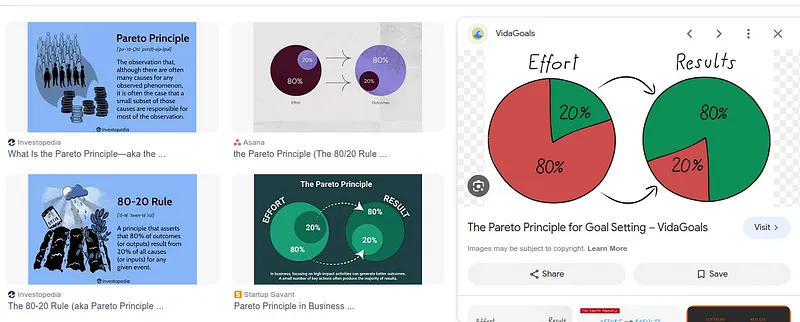
This means learning the basic rules, control structures, types of data, and main libraries. Instead of trying to learn everything about Python, focus on the most important parts that help you the most.
## How to Learn Python in 8 Weeks - The Plan
## Week 1: Python Basics
### Day 1: Introduction to Python
- **Learn:** Watch [Python Full Course for Beginners](https://www.youtube.com/watch?v=_uQrJ0TkZlc) (first 10 minutes)
- **Read:** [The Python Tutorial - Python.org](https://docs.python.org/3/tutorial/introduction.html) (Introduction section)
- **Exercise:** Install Python and write your first script: print "Hello, World!"
### Day 2: Python Variables and Data Types
- **Learn:** Watch [Python Variables and Data Types](https://www.youtube.com/watch?v=vTX3IwquFkc) (10 minutes)
- **Read:** [Python Variables - W3Schools](https://www.w3schools.com/python/python_variables.asp)
- **Exercise:** Practice creating variables of different data types: string, int, float, and bool.
### Day 3: Basic Operators
- **Learn:** Watch Python Operators
- **Read:** [Python Operators - W3Schools](https://www.w3schools.com/python/python_operators.asp)
- **Exercise:** Create simple expressions using arithmetic, comparison, and logical operators.
### Day 4: Python Strings
- **Learn:** Watch [Python Strings and String Manipulation](https://www.youtube.com/watch?v=k9TUPpGqYTo) (first 10 minutes)
- **Read:** [Python Strings - W3Schools](https://www.w3schools.com/python/python_strings.asp)
- **Exercise:** Practice with string concatenation, methods, and formatting.
### Day 5: Control Flow - if, elif, else
- **Learn:** Watch [Python If Else Statements](https://www.youtube.com/watch?v=f4KOjWS_KZs) (10 minutes)
- **Read:** [Python If...Else - W3Schools](https://www.w3schools.com/python/python_conditions.asp)
- **Exercise:** Write a program that uses if, elif, and else statements to handle multiple conditions.
### Day 6: Loops in Python
- **Learn:** Watch [Python Loops](https://www.youtube.com/watch?v=6iF8Xb7Z3wQ) (10 minutes)
- **Read:** [Python While Loops - W3Schools](https://www.w3schools.com/python/python_while_loops.asp)
- **Exercise:** Write a while loop that prints numbers from 1 to 10.
### Day 7: Review and Practice
- **Exercise:** Solve exercises on [Exercism's Python Track](https://exercism.io/tracks/python/exercises) to review the week's concepts.
## Week 2: Data Structures
### Day 8: Lists
- **Learn:** Watch [Python Lists](https://www.youtube.com/watch?v=9oKl99PEbHw) (10 minutes)
- **Read:** [Python Lists - W3Schools](https://www.w3schools.com/python/python_lists.asp)
- **Exercise:** Create a list, add items, remove items, and iterate over the list.
### Day 9: Dictionaries
- **Learn:** Watch [Python Dictionaries](https://www.youtube.com/watch?v=daefaLgNkw0) (10 minutes)
- **Read:** [Python Dictionaries - W3Schools](https://www.w3schools.com/python/python_dictionaries.asp)
- **Exercise:** Create a dictionary, add key-value pairs, access values, and use a loop to print all keys.
### Day 10: Tuples
- **Learn:** Watch [Python Tuples](https://www.youtube.com/watch?v=W8KRzm-HUcc) (10 minutes)
- **Read:** [Python Tuples - W3Schools](https://www.w3schools.com/python/python_tuples.asp)
- **Exercise:** Create a tuple, access its elements, and understand the concept of immutability.
### Day 11: Sets
- **Learn:** Watch [Python Sets](https://www.youtube.com/watch?v=sBvaPopWOmQ) (10 minutes)
- **Read:** [Python Sets - W3Schools](https://www.w3schools.com/python/python_sets.asp)
- **Exercise:** Create a set, add and remove items, and perform basic set operations (union, intersection).
### Day 12: Functions
- **Learn:** Watch [Python Functions](https://www.youtube.com/watch?v=9Os0o3wzS_I) (10 minutes)
- **Read:** [Python Functions - W3Schools](https://www.w3schools.com/python/python_functions.asp)
- **Exercise:** Write a function that takes arguments and returns a value; call the function to test it.
### Day 13: Modules
- **Learn:** Watch [Python Modules](https://www.youtube.com/watch?v=sugvnHA7ElY) (10 minutes)
- **Read:** [Python Modules - W3Schools](https://www.w3schools.com/python/python_modules.asp)
- **Exercise:** Import a module and use a function from it (e.g., `math` module).
### Day 14-15: Review and Practice
- **Exercise:** Tackle more complex exercises on HackerRank Python Practice.
## Week 3: Advanced Data Structures and Comprehensions (Continued)
### Day 16: Dictionary Comprehensions
- **Learn:** Watch Python Dictionary Comprehension Tutorial (10 minutes)
- **Read:** [Dictionary Comprehensions in Python - DataCamp](https://www.datacamp.com/community/tutorials/python-dictionary-comprehension)
- **Exercise:** Create dictionary comprehensions to transform and filter data.
### Day 17: Set Comprehensions
- **Learn:** Explore set comprehensions through Python Set Comprehensions(Read for 10 minutes)
- **Exercise:** Practice creating sets using set comprehensions with various conditions.
### Day 18: File Handling
- **Learn:** Watch [Python File Handling](https://www.youtube.com/watch?v=Uh2ebFW8OYM) (10 minutes)
- **Read:** [Python File Handling - W3Schools](https://www.w3schools.com/python/python_file_handling.asp)
- **Exercise:** Practice opening, reading, writing, and appending to files in Python.
### Day 19: Working with JSON in Python
- **Learn:** Watch [Python JSON](https://www.youtube.com/watch?v=9N6a-VLBa2I) (10 minutes)
- **Read:** [Python JSON - W3Schools](https://www.w3schools.com/python/python_json.asp)
- **Exercise:** Practice parsing JSON and converting Python objects to JSON format.
### Day 20: Review and Practice
- **Exercise:** Complete exercises related to this week's topics on platforms like [Exercism](https://exercism.io/tracks/python/exercises) or HackerRank.
## Week 4: Functions and Error Handling
### Day 21: Functions Deep Dive
- **Learn:** Watch [Python Functions - Core Programming](https://www.youtube.com/watch?v=9Os0o3wzS_I) (10 minutes)
- **Read:** [Python Functions - Real Python](https://realpython.com/defining-your-own-python-function/)
- **Exercise:** Write functions with different types of parameters, default values, and keyword arguments.
### Day 22: Lambda Functions
- **Learn:** Watch [Python Lambda Functions](https://www.youtube.com/watch?v=hYzwCsKGRrg) (10 minutes)
- **Read:** [Python Lambda - W3Schools](https://www.w3schools.com/python/python_lambda.asp)
- **Exercise:** Practice creating simple lambda functions for quick tasks.
### Day 23: Error and Exception Handling
- **Learn:** Watch [Python Exception Handling](https://www.youtube.com/watch?v=NIWwJbo-9_8) (10 minutes)
- **Read:** [Python Try Except - W3Schools](https://www.w3schools.com/python/python_try_except.asp)
- **Exercise:** Write code blocks using try, except, else, and finally to handle errors gracefully.
### Day 24: Modules and Packages
- **Learn:** Watch [Python Modules and Packages](https://www.youtube.com/watch?v=sugvnHA7ElY) (10 minutes)
- **Read:** [Python Modules - Real Python](https://realpython.com/python-modules-packages/)
- **Exercise:** Create a simple module and import it into another Python script.
### Day 25-26: Intermediate Projects
- **Activity:** Start a small project to apply the concepts learned. This could be a simple data analysis using external libraries or a small web scraping script.
### Day 27: Review and Practice
- **Exercise:** Review the week's learning and practice any concepts you find challenging. Utilize coding challenge platforms for more practice.
## Week 5: Diving into Data Science with Python
Learn to manipulate and visualize data using Python.
**Day 28-29:**
- **Learn & Practice:** Get started with pandas by reading [10 Minutes to pandas](https://pandas.pydata.org/pandas-docs/stable/user_guide/10min.html) and experimenting with data frames.
**Day 30-31:**
- **Learn & Practice:** Explore data visualization with matplotlib by following the [Matplotlib Pyplot tutorial](https://matplotlib.org/stable/tutorials/introductory/pyplot.html).
**Day 32-33:**
- **Project:** Work on a data analysis project. Use a dataset from [Kaggle](https://www.kaggle.com/datasets) and perform data cleaning, manipulation, and visualization.
## Week 6: Web Development with Flask
Build a basic web application using Flask.
**Day 34-35:**
- **Learn:** Watch [Python Flask for Beginners](https://www.youtube.com/watch?v=Z1RJmh_OqeA) and set up a basic Flask project.
**Day 36-37:**
- **Learn & Practice:** Expand your Flask app by adding new routes and views. Follow tutorials from the [Flask documentation](https://flask.palletsprojects.com/en/2.0.x/tutorial/).
**Day 38-39:**
- **Project:** Create a simple web application like a to-do list or a personal diary app where users can add, delete, or edit entries.
## Week 7: Object-Oriented Programming (OOP)
Deepen your understanding of OOP in Python.
**Day 40-42:**
- **Learn & Practice:** Study OOP with [Real Python’s tutorial](https://realpython.com/python3-object-oriented-programming/). Practise creating classes, objects, inheritance, and polymorphism.
**Day 43-44:**
- **Project:** Develop a simple command-line application (e.g., a contact book or an inventory system) using OOP principles.
**Day 46:**
- **Review:** Go over the concepts and code from the week to consolidate your learning.
## Week 8: Final Project and Exploration
Apply all the concepts learned in a comprehensive project.
**Day 47-51:**
- **Project:** Start a project that interests you. It could be a more advanced data analysis project, a more complex web application, or an automation script. Plan, design, code, and test your project.
**Day 52-53:**
- **Review & Extend:** Review your project, add documentation, and consider any additional features or improvements. Explore any libraries or frameworks that could enhance your project.
By the end of these eight weeks, you should have a solid foundation in Python and practical experience with a range of applications.
## My Personal Tips to Learn Python Effectively
- Use techniques like the Pomodoro Technique (study for 25 minutes, then take a 5-minute break) to maintain focus and avoid burnout.
- Engage with Python communities on platforms like Stack Overflow or Reddit's r/learnpython to get insights
- Consistency is Key. Even if it's just 30 minutes, do it daily without fail.
- Practice every day
Learning Tracking Sheet
You can download a tracking sheet from this link. It will help you track your progress and stay motivated. [Download Learning Tracking Sheet](/assets/blog/how-to-learn-python-effectively/python-learning-tracking-sheet-proflead-dev.pdf)
That’s it! :) If you like this article please don’t forget to share it with your friends! Thanks!